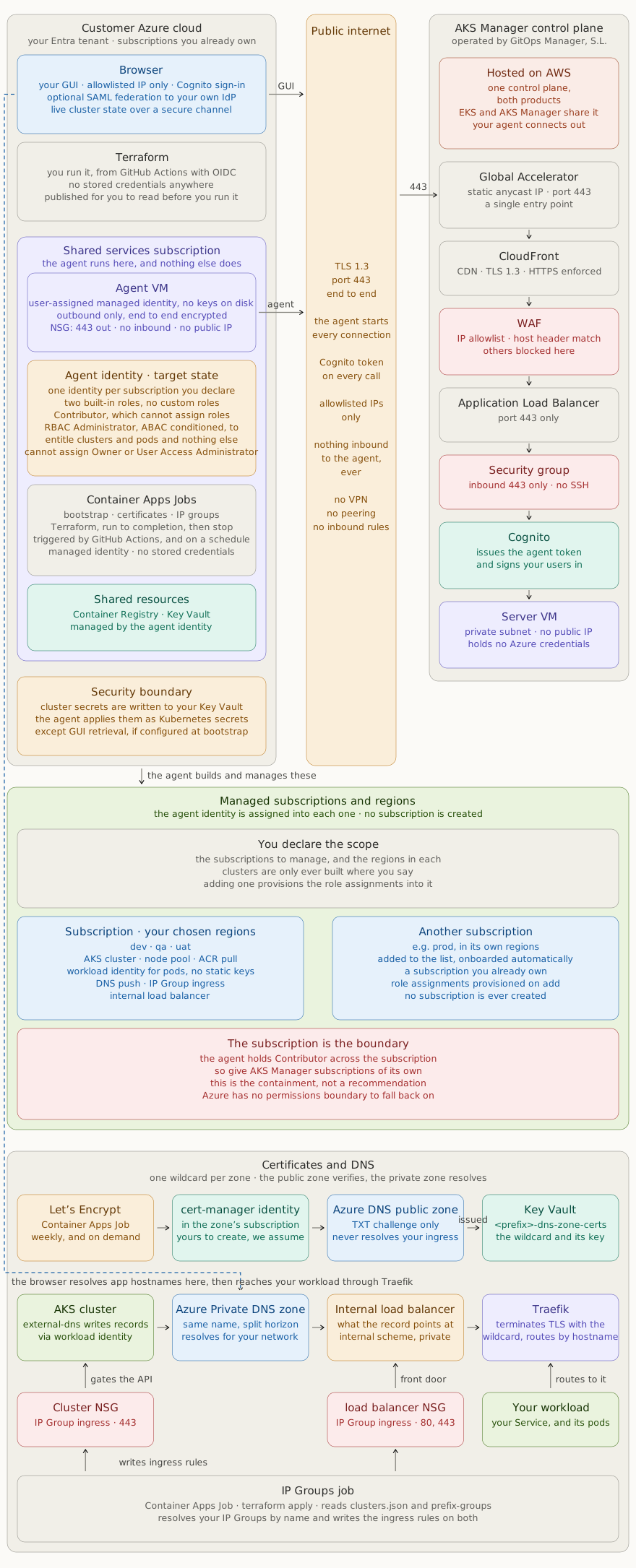
AKS Manager architecture · your Azure subscriptions (left) · the public internet (centre) · the control plane, on AWS (right)
An outbound-only agent runs in your own Azure subscription and starts every connection. Nothing reaches inbound, there is no VPN and no peering. You declare the subscriptions and regions to manage; no subscription is ever created on your behalf. The control plane is hosted on AWS and is the same one that serves EKS Manager.
AKS Manager architecture · your Azure subscriptions (left) · the public internet (centre) · the control plane, on AWS (right)
Every design decision keeps your data inside your cloud and gives your security team nothing to worry about.
The agent in your shared services subscription starts every connection outbound on port 443, over the public internet and encrypted end to end. There are no inbound rules, no VPN and no peering. It presents a Cognito token on every call, and only allowlisted addresses are accepted. If the agent stops, the connection drops and nothing can reach in.
Every request passes through Global Accelerator, CloudFront, WAF, an Application Load Balancer and a security group before it reaches the Server VM. The WAF enforces the IP allowlist and a host header match, so an address that is not on the list is dropped before it reaches anything that matters.
One control plane serves both products: the same platform behind EKS Manager and AKS Manager. Your agent runs in Azure and connects out to it. That means a customer running both clouds gets one interface across the estate, and it also means your agent talks to a service hosted on AWS. We would rather you knew that from the architecture page than discovered it during a review.
Secrets are entered in the GUI or the API and relayed over TLS to the agent. The server is a transient relay, nothing is persisted there. The agent writes the value to Key Vault in your own subscription, and from that point it never leaves your cloud. A new value can be pushed on top at any time without exposing the old one. Values can be read back through the GUI only if that was enabled at bootstrap.
You declare the subscriptions to manage and the regions in each. Adding one provisions the role assignments into it, and clusters are only ever built where you said. No subscription is ever created on your behalf: these are subscriptions you already own, in your own tenant.
The agent is deployed by Terraform that you run from GitHub Actions using OIDC, so there are no stored credentials on either side. The bootstrap creates, for each subscription you declare, a managed identity and the roles it needs, so nothing is granted by hand and nothing is granted in a subscription you did not name. The recurring work, certificate renewal and IP group updates, runs as Container Apps Jobs in your own subscription, on a schedule. The module is published for you to read before you run it.
The agent holds Contributor across the subscriptions you declare, so the subscription is the boundary, exactly as the account is on AWS. It is worth being direct about this: on AWS the agent is additionally capped by a permissions boundary and deny statements that cannot be overridden, and Azure has neither. The boundary therefore carries more weight here, which is why we ask that AKS Manager is given subscriptions of its own rather than sharing one with unrelated systems. That is the containment, not a nicety. Inside a cluster, pods use workload identity for short-lived tokens rather than static keys, so a compromised workload holds nothing durable and reaches nothing outside its own service account. Note that Azure has no equivalent of assuming a separate role per account: the agent identity is granted access in each subscription you declare, so its reach is the scope you gave it. That is the boundary to reason about, and it is why the scope is something you declare rather than something we discover.
The target is one managed identity per subscription holding two built-in roles and no custom role: Contributor, which notably cannot assign roles, and Role Based Access Control Administrator restricted by an ABAC condition, which can assign only a fixed list of roles to entitle clusters and pods. That condition is what stops the agent creating privilege beyond what it already has. On AWS a permissions boundary caps the roles the agent itself creates; Azure has no equivalent, so the cap is applied when a role is assigned instead. Either way this bounds what the product can grant, not what you can. Roles and workload identities you create for your own applications are yours, and nothing here reaches into them. The Azure agent is currently broader than this, so it is marked as the target state on the diagram rather than described as though it were already true.
The agent is installed by Terraform, run from a pipeline in your own Azure subscription. No inbound firewall rules, no VPN, and no persistent credentials on our side.